Leading the shift to AI-driven design
When Catapult’s engineering org adopted AI-driven development, it got much faster, and the traditional design-to-development handoff couldn’t keep up. I led the shift that let design keep pace, by moving my own work into the codebase: prototyping in the real product environment, shipping production code, and building a process the rest of the design team could adopt.
Role
Product Designer
Timeline
2025–Present
Focus
AI-driven design process
Outcome
Full design-team adoption by Feb 2026
The catalyst
At the end of 2025, Catapult’s engineering leadership committed to AI-driven development. Velocity increased sharply. Work that used to take a full sprint could land in days, and in some cases the same afternoon.
That created a problem for design. The established process (explore in Figma, document an extensive spec, hand it to engineering, wait for a build cycle) was built around a slower pace of development. Next to AI-accelerated engineering, it was on track to become the slowest part of the pipeline. If design didn’t change how it worked, it would become the bottleneck.
The shift
The front of the process didn’t change. A request still comes from product, and I still do the same discovery: understanding the problem, the users, and the constraints. AI speeds that research up, but it isn’t the part that fundamentally changed.
The change happens at the point where I used to open Figma. Instead of drawing the solution, I take the discovery directly into Claude Code and build a working prototype, often right inside the product environment, on a branch, using the real design-system tokens, the real interactions, the real workflows. Product reviews something real and testable rather than a static mock. I iterate. Then engineering inherits working code instead of a document to re-interpret.
Three things changed:
- Prototyping went from a luxury to the default. It used to happen only when there was time, which in practice meant almost never. Now it’s the first move.
- Validation became real. Stakeholders test the actual thing instead of imagining it from flat screens, so the feedback is more honest and arrives earlier.
- Handoff stopped being translation, the biggest change of the three. A spec is a designer describing an intended outcome and a developer re-interpreting it, and re-interpretation is where design intent gets lost. Now engineering inherits the intended outcome directly. Nothing gets lost, because nothing gets redrawn.
Figma didn’t go away. It moved back to what it’s best at: design-system documentation, graphic work, and archiving discovery. It’s no longer the fastest, most accurate way to get an idea into development. A working prototype is.
Day to day, that plays out as two modes, depending on whether I’m designing outside the product or directly inside its codebase:
The trade
The part I’m most proud of isn’t technical.
A designer generating code is threatening to engineers, and understandably so. It touches their craft, their ownership, and their quality bar at the same time. So I made the trade deliberately: I gave up owning the code in order to win what I cared about: the experience landing exactly right.
In practice, my branch is a starting point, not a finished answer. It gets the work roughly 80% of the way there, and engineering owns 100% of the code structure and implementation: they finish it, refine it, and make the calls that are theirs to make. On back-end-heavy work, they often rebuild it entirely and reuse my front-end code. That’s the intended outcome, not a compromise.
What I get in return is precision. No more accepting an 80%-accurate version of an interaction I designed. The UX lands as intended, because it was built rather than described. Engineering gets something too: they’re no longer on the hook for guessing the UX correctly. It took time for that to feel like relief instead of an intrusion, but it did.
I sought no code ownership — just outcomes for the users.
Proof
An accessibility audit that would have cost $40,000
The clearest example is an accessibility effort with real money attached: WCAG 2.2 AA compliance was contractually required, and revenue was at risk.
An app-wide accessibility audit is exactly the kind of work that used to be a slog: hundreds of violations spread across the codebase, most of them small, all of them tedious. Working in the product environment with open-source accessibility tooling (axe) and AI, I found and addressed 30–50% of the violations in a matter of days, and reduced the remainder to a manual audit a person could realistically finish. Bringing in a professional auditor would have cost north of $40,000. We didn’t need to.
I took the straightforward fixes all the way to production myself as pull requests. The heavier, structural work became scoped tickets for the team.
The scan covered 278 source files: contrast pairs checked in both themes, touch targets measured against WCAG 2.2’s 24×24 minimum, ARIA patterns counted, and every finding pinned to the file it lives in. What the automated pass couldn’t close is tracked on a dedicated voltron-accessibility branch. Open the generated report →
The compliance deadline was later pushed back a year, though, and the business reasonably re-prioritized work that wasn’t yet earning revenue. We’re a long way toward the goal, and the remaining gap is known and documented rather than a mystery. But the point was never a compliance checkmark. It’s that a slow, expensive effort became a fast, inexpensive one.
The everyday proof: features built in the codebase
The accessibility work is the clearest dollar figure, but the everyday proof is smaller and more constant: features I built directly in the product’s codebase.
The data-entry rescue. In Hub Pro, the data table is also the playlist: coaches enter and edit data in the same place they queue video. A broken interaction model had made it into the build: cells had no focus state, and leaving an edit auto-advanced into the next cell’s edit mode, which hijacked video playback and locked up keyboard shortcuts mid-workflow. It was my first task in the new environment, and I fixed it in code, restoring a proper focus and navigation layer. The instructive part wasn’t the fix itself. It was recognizing that the right move was not to invent something clever. It was to match the patterns coaches already knew from the legacy app. Being in the codebase is what let me get that exactly right.
The multi-angle configuration menu. Coaches assign camera angles to a multi-monitor layout. The old control was a checkbox picker that didn’t map to how the angles are actually arranged in the room. I replaced it with a small dialog where you toggle angles and drag them into position. I designed, built and iterated it with AI, then shipped it as a pull request in the dev environment. Idea to working code in the real product, in a fraction of the old timeline.
The visual overhaul. An app-wide visual modernization was the clearest case for working this way. Polish lives in values that are easy to specify and easy to lose (color, rounding, spacing), and in a handoff they get approximated once and rarely revisited. Setting those tokens in the codebase meant judging them against the running product instead of a static frame, and shipping them at the values I picked rather than an approximation of them.
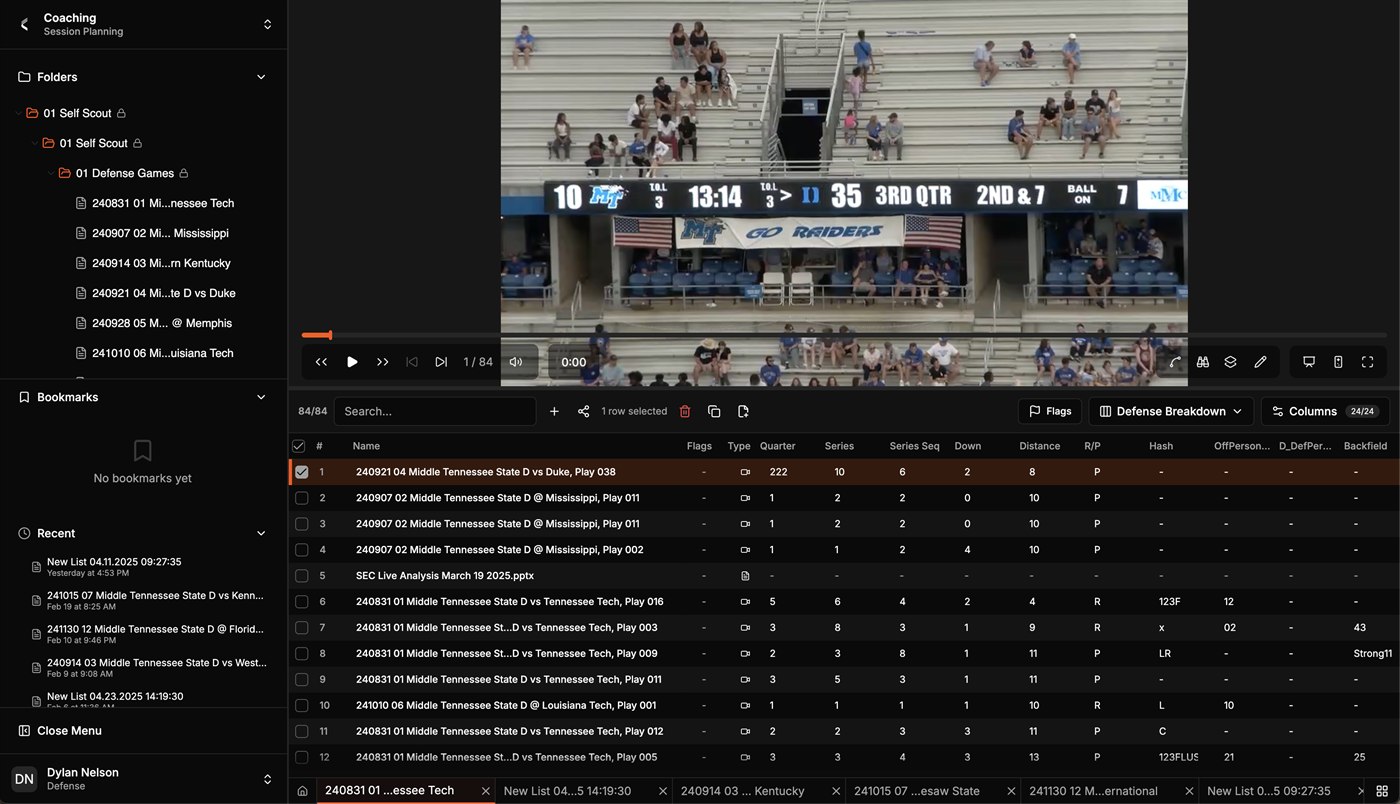
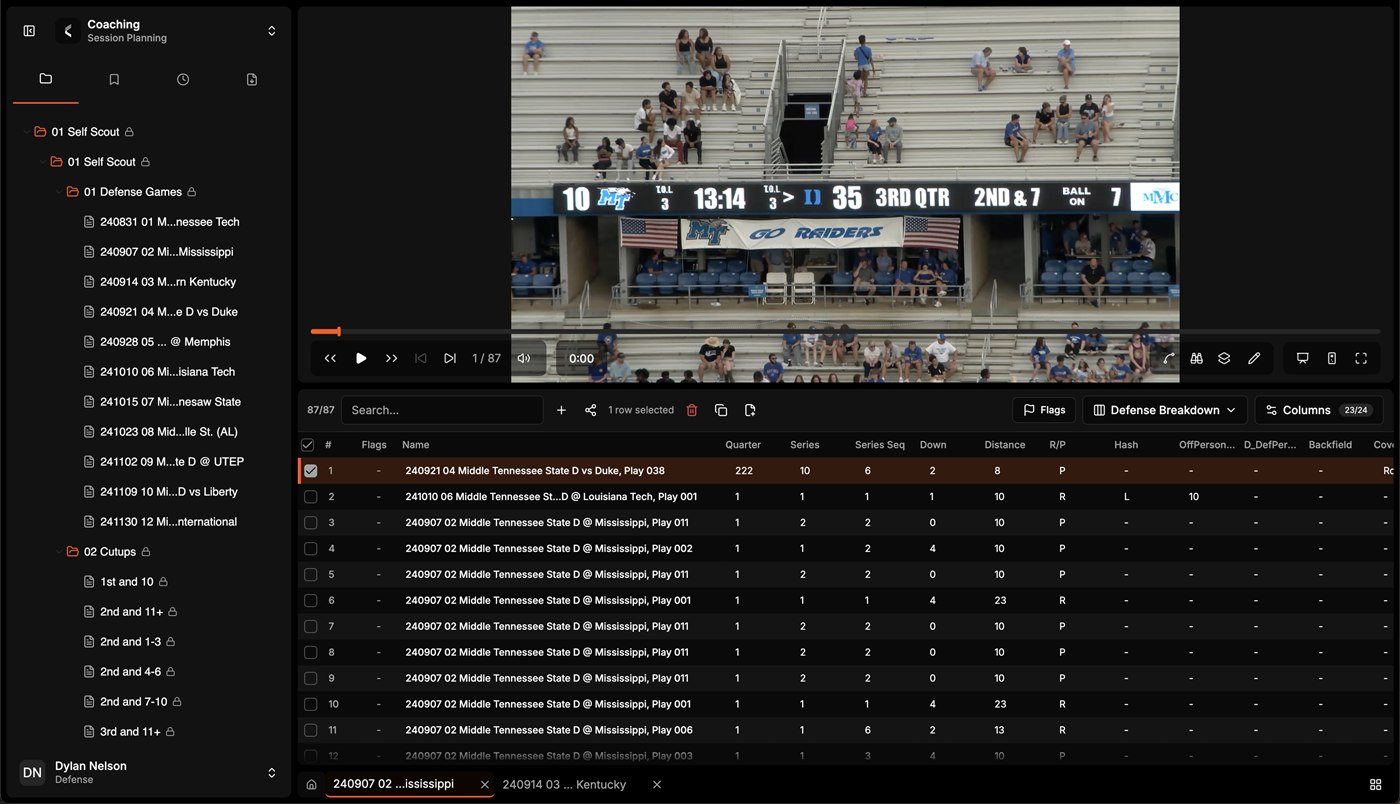
The regions didn’t move. The folder tree, the player, and the table sit where they always sat. The change is that they read as separate surfaces instead of cells in a grid. Swapping the sidebar’s stacked section headings for a row of icon tabs bought back enough vertical space to show a second folder and its cutups without scrolling, and the table dropped a column it didn’t need.
Leading it
Doing this alone would just make me a faster designer. Leading it meant bringing the rest of the team with me.
Getting here wasn’t clean. When engineering adopted Claude Code around the end of 2025, there was heavy resistance to anyone outside engineering getting access. My director, John Sakalowsky, and I made the case together, and the design team got in. But the real unlock was using it inside a real project’s codebase, so I went first, on our flagship product, and made plenty of mistakes and stepped on plenty of toes so the people who came after me wouldn’t have to.
Most of the design team had never worked in GitHub: branches, commits, and pull requests were all new. So I kept presenting my process back to them, turning what I’d worked out the hard way into something they could pick up directly. By the beginning of February 2026, the design team had fully adopted the process, and designers are working this way today.
I created the trust for them to inherit, and delivered a process for adoption.
I was also deliberate about how far I encouraged this to spread. When I documented the workflow for the broader product organization, I framed the lighter handoff as the default and kept the in-the-codebase path in the background, because not everyone should be creating branches, and part of leading a change responsibly is being careful about how widely it travels.
Where it landed
Design keeps pace with engineering now, because the handoff is working software instead of a document to decode. Other designers are working this way because there’s a path to follow. And the work itself is closer to what I came here to do: not to hand off pictures of good software, but to help build it.